Review the order and choose the appropriate payment controls.
Review the order and choose the appropriate payment controls.Where: POS device → sales screen → Checkout, Cash, or Card
1
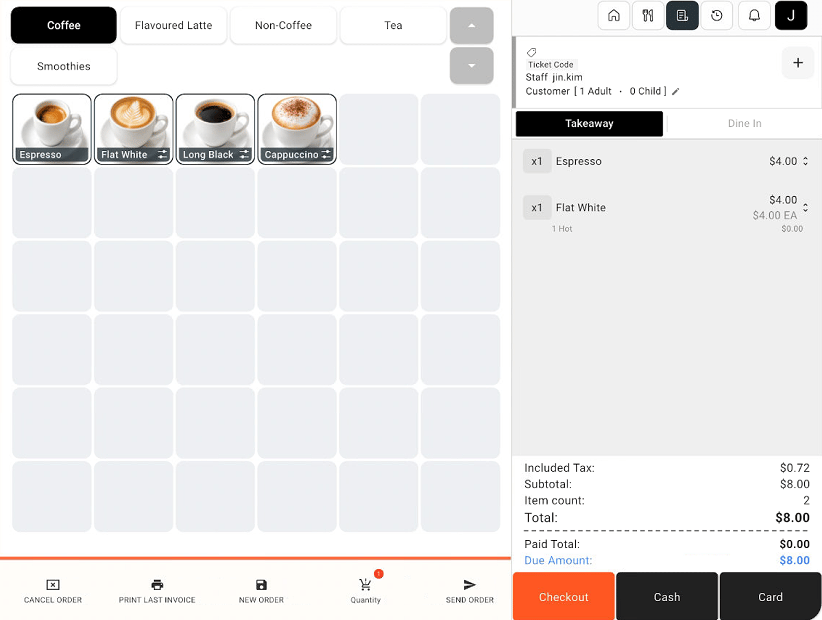
Review the current order
Check the items, selected options, quantities, discounts, and total in the order panel.
Sales screen with an order and Checkout, Cash, and Card buttons
2
Choose how to proceed
Select Cash or Card to proceed with that payment method, or select Checkout to review the checkout screen first.
3
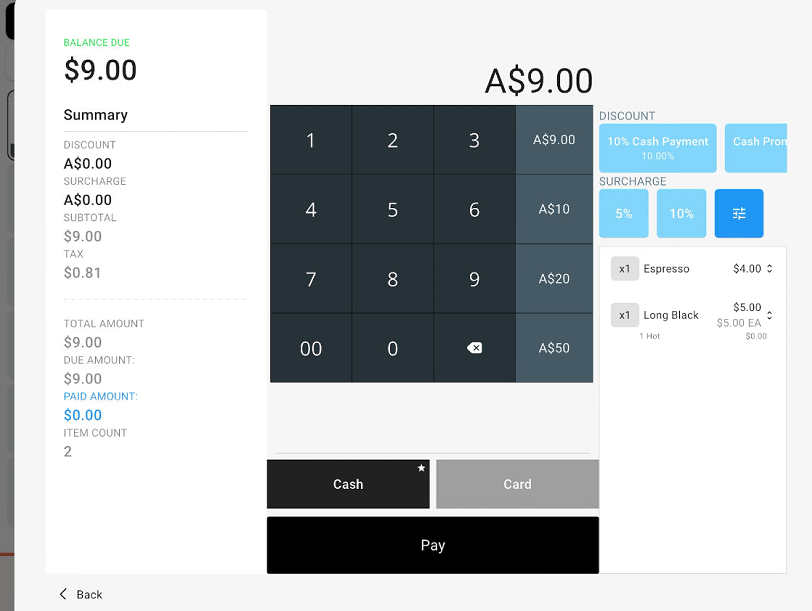
Review checkout adjustments
On Checkout, review the summary and balance due. If an adjustment is needed, use the configured discount, cash promotion, surcharge, or custom adjustment controls available on the screen. Check the resulting total before proceeding.
Checkout screen with order summary, adjustment controls, payment methods, and Pay
4
Proceed with payment
Select Cash or Card on the checkout screen, review the amount, then select Pay. Follow the payment prompts shown by POBLE or the connected terminal.
Checkout opens the order review and payment screen; it is not a separate payment method.