> ## Documentation Index
> Fetch the complete documentation index at: https://docs.poble.com.au/llms.txt
> Use this file to discover all available pages before exploring further.
# 营业时间
> 为每天设置开始营业、结束营业和休息时间。
在所选门店的 **Store Settings** 中设置常规营业时间。
## 营业时间
从公司/门店选择器中选择门店,然后打开 **Store Settings**。
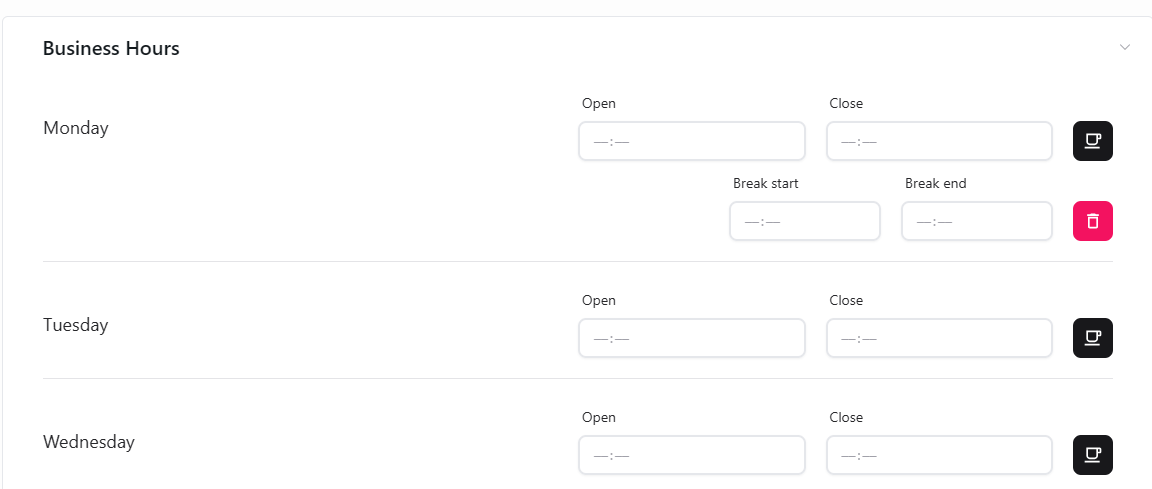
展开 **Business Hours**,为需要配置的日期填写 **Open** 和 **Close** 时间。
使用日期旁的休息控件添加 **Break start** 和 **Break end** 时间。不再需要时,使用删除控件移除该休息时段。
检查每天的营业和休息时间,再使用页面控件应用更改。
 使用 **Business Hours Message** 说明公共假日时间、特别营业安排或临时休业。
## 相关指南
* [营业时间通知](/zh/poble-manual/store-settings/business-hours-message)
This documentation is built and hosted on [Mintlify](https://mintlify.com), a developer documentation platform.
使用 **Business Hours Message** 说明公共假日时间、特别营业安排或临时休业。
## 相关指南
* [营业时间通知](/zh/poble-manual/store-settings/business-hours-message)
This documentation is built and hosted on [Mintlify](https://mintlify.com), a developer documentation platform.