> ## Documentation Index
> Fetch the complete documentation index at: https://docs.poble.com.au/llms.txt
> Use this file to discover all available pages before exploring further.
# 修改数量与移除商品
> 调整当前订单中的商品数量,或移除所选商品。
调整当前订单中的商品数量,或移除所选商品。
**位置:** POS 设备 → 销售界面 → 商品数量
在订单面板中选择商品名称旁的数量,例如 **x1**。
在 **Enter Quantity** 中使用 **−**、**+** 或数字键盘输入新数量,然后选择 **Change**。
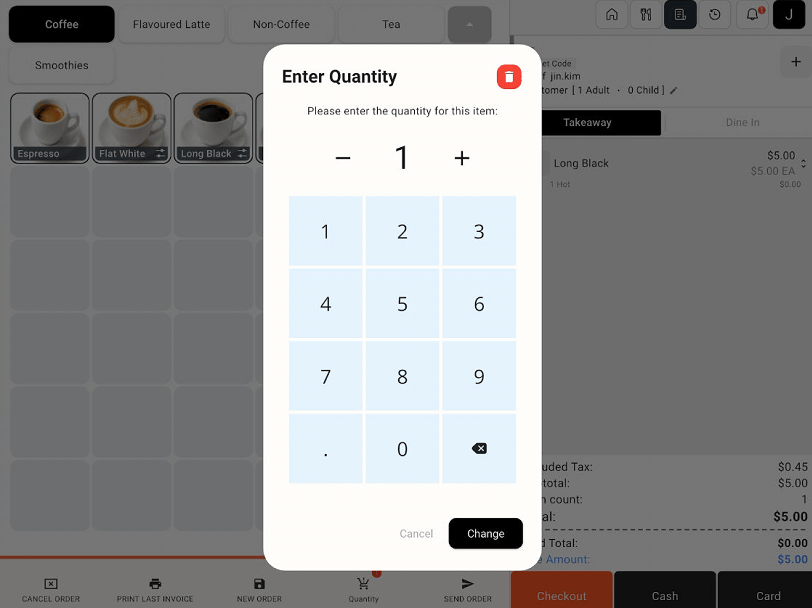 要移除所选商品,请使用数量窗口中的红色删除图标。按后续提示操作,再检查订单和更新后的总额。
移除前请检查所选商品。如需取消整个订单,请使用 **Cancel Order**。
## 相关指南
* [取消订单](/zh/poble-manual/sales-payments/cancel-order)
* [应用商品折扣与添加备注](/zh/poble-manual/sales-payments/item-discounts-notes)
This documentation is built and hosted on [Mintlify](https://mintlify.com), a developer documentation platform.
要移除所选商品,请使用数量窗口中的红色删除图标。按后续提示操作,再检查订单和更新后的总额。
移除前请检查所选商品。如需取消整个订单,请使用 **Cancel Order**。
## 相关指南
* [取消订单](/zh/poble-manual/sales-payments/cancel-order)
* [应用商品折扣与添加备注](/zh/poble-manual/sales-payments/item-discounts-notes)
This documentation is built and hosted on [Mintlify](https://mintlify.com), a developer documentation platform.