> ## Documentation Index
> Fetch the complete documentation index at: https://docs.poble.com.au/llms.txt
> Use this file to discover all available pages before exploring further.
# 在 POS 上打开菜单管理
> 从 POS 主屏幕打开菜单工具。
从 POS 主屏幕打开菜单工具。
**位置:** POS 设备 → 主屏幕 → Menu Management
进入要管理门店的 POS 主屏幕。
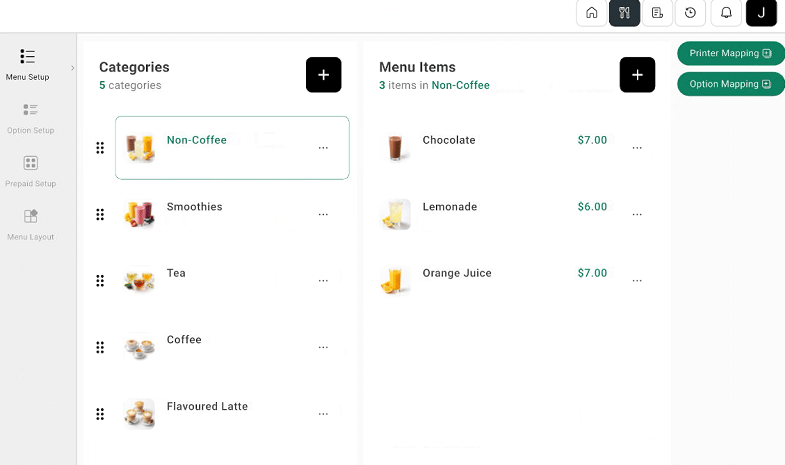
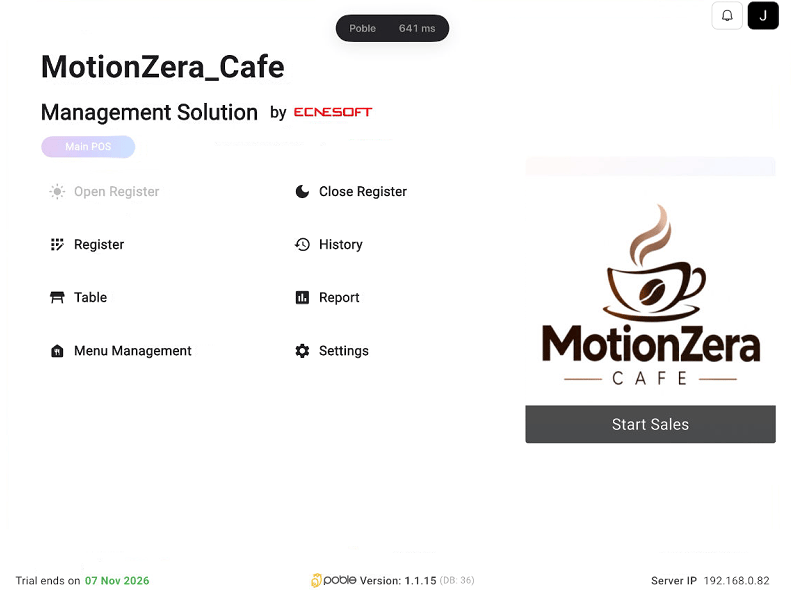 选择 **Menu Management**,即可使用 **Menu Setup**、**Option Setup**、**Prepaid Setup** 和 **Menu Layout**。
 POS 主屏幕上的 **Menu Management** 与 **Settings** 是不同控件。本组指南中的菜单工具请从 **Menu Management** 打开。
## 相关指南
* [在 POS 上创建菜单分类](/zh/poble-manual/menu-management/pos/create-categories)
* [在 POS 上创建菜单商品](/zh/poble-manual/menu-management/pos/manage-items)
This documentation is built and hosted on [Mintlify](https://mintlify.com), a developer documentation platform.
POS 主屏幕上的 **Menu Management** 与 **Settings** 是不同控件。本组指南中的菜单工具请从 **Menu Management** 打开。
## 相关指南
* [在 POS 上创建菜单分类](/zh/poble-manual/menu-management/pos/create-categories)
* [在 POS 上创建菜单商品](/zh/poble-manual/menu-management/pos/manage-items)
This documentation is built and hosted on [Mintlify](https://mintlify.com), a developer documentation platform.