> ## Documentation Index
> Fetch the complete documentation index at: https://docs.poble.com.au/llms.txt
> Use this file to discover all available pages before exploring further.
# 将选项分配给商品
> 将选项组关联至菜单商品,让顾客定制订单。
将选项组关联至菜单商品,让顾客定制订单。
**位置:** POS 设备 → Menu Management → Menu Setup → Option Mapping
在 **Menu Setup** 中选择 **Option Mapping**,打开 **Manage Item Options**。
选择 **Item Category**,然后选择要配置的商品。
选择所需的 **Option Groups**。检查 **Selected Option Groups**,并拖动调整顺序。
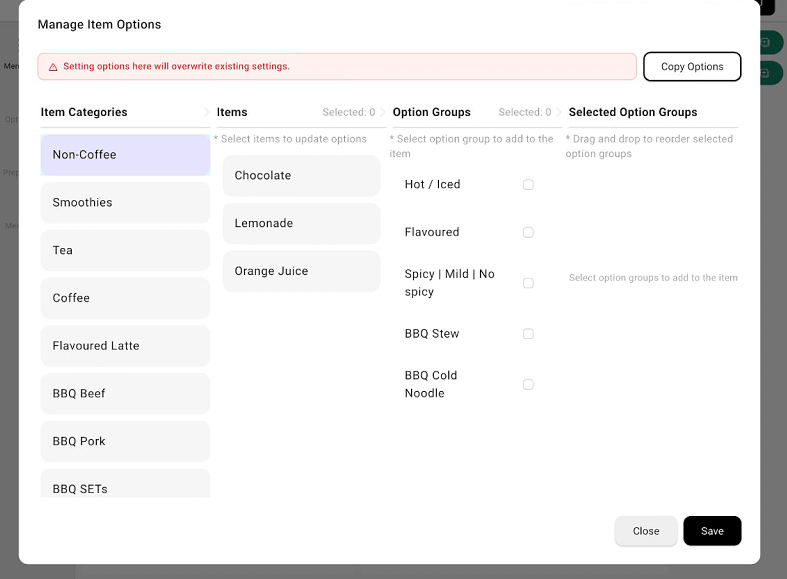 检查所选商品和选项组,然后选择 **Save**。
界面提示,此处设置选项会覆盖现有设置。保存前请检查所选商品及其当前选项。
## 相关指南
* [创建与管理商品选项](/zh/poble-manual/menu-management/company/create-options)
* [在 POS 上管理商品选项](/zh/poble-manual/menu-management/pos/manage-options)
This documentation is built and hosted on [Mintlify](https://mintlify.com), a developer documentation platform.
检查所选商品和选项组,然后选择 **Save**。
界面提示,此处设置选项会覆盖现有设置。保存前请检查所选商品及其当前选项。
## 相关指南
* [创建与管理商品选项](/zh/poble-manual/menu-management/company/create-options)
* [在 POS 上管理商品选项](/zh/poble-manual/menu-management/pos/manage-options)
This documentation is built and hosted on [Mintlify](https://mintlify.com), a developer documentation platform.