> ## Documentation Index
> Fetch the complete documentation index at: https://docs.poble.com.au/llms.txt
> Use this file to discover all available pages before exploring further.
# 填写付款信息并开始试用
> 完成账单设置,并开始结账页面显示的试用。
填写付款页面以完成账户设置。Notion 手册介绍了 **30 天免费试用**;开始前请检查结账页面显示的优惠和条款。
## 填写付款信息并开始试用
检查所选方案、附加功能、**Total after trial** 和 **Total due today**。
填写联系方式、卡号、有效期、CVC 和持卡人姓名。
填写付款表单要求的账单地址及企业或 ABN 信息。
检查信息和显示的费用,然后选择 **Start trial**。
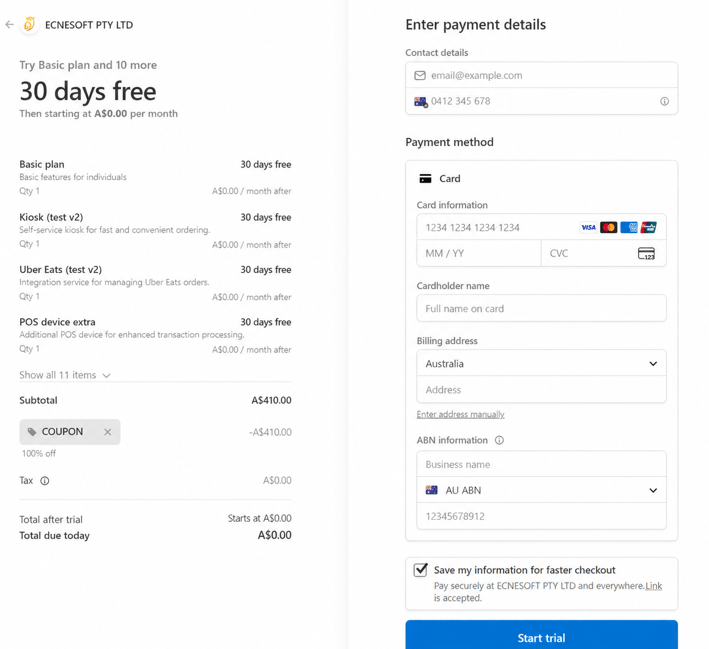 您的注册适用结账页面显示的试用期限和费用。即使与示例不同,也请核对实际显示的信息。
## 相关指南
* [公司设置](/zh/poble-manual/company-settings/overview)
This documentation is built and hosted on [Mintlify](https://mintlify.com), a developer documentation platform.
您的注册适用结账页面显示的试用期限和费用。即使与示例不同,也请核对实际显示的信息。
## 相关指南
* [公司设置](/zh/poble-manual/company-settings/overview)
This documentation is built and hosted on [Mintlify](https://mintlify.com), a developer documentation platform.