> ## Documentation Index
> Fetch the complete documentation index at: https://docs.poble.com.au/llms.txt
> Use this file to discover all available pages before exploring further.
# 选择订阅方案
> 选择适合您业务的订阅方案。
在 **Choose Your Subscription Plan** 页面查看可用方案,选择符合业务需求的一项。
## 选择订阅方案
查看各方案的功能和显示的月费。示例 **Basic plan** 包含双屏、外带、菜单管理、订单管理和基础报表。
选择要使用的方案。已选方案将显示 **Selected**。
前往 **Customise with Add-ons**,选择所需的附加功能。
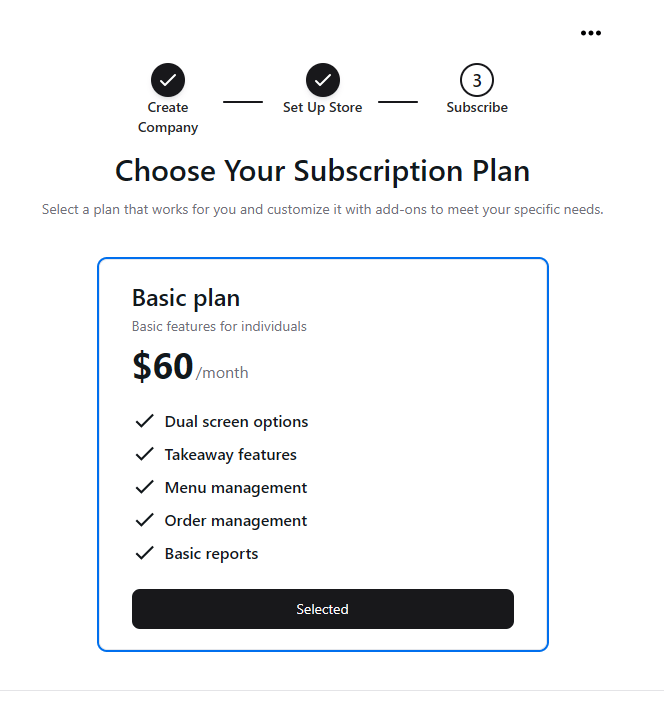 请以当前设置界面显示的价格和功能为准。截图仅为原始界面示例。
## 相关指南
* [选择附加功能](/zh/poble-manual/getting-started/customise-with-add-ons)
This documentation is built and hosted on [Mintlify](https://mintlify.com), a developer documentation platform.
请以当前设置界面显示的价格和功能为准。截图仅为原始界面示例。
## 相关指南
* [选择附加功能](/zh/poble-manual/getting-started/customise-with-add-ons)
This documentation is built and hosted on [Mintlify](https://mintlify.com), a developer documentation platform.