> ## Documentation Index
> Fetch the complete documentation index at: https://docs.poble.com.au/llms.txt
> Use this file to discover all available pages before exploring further.

# 公司设置

> 管理门店、人员、权限、公司信息、品牌图片和在线收款。

管理门店、人员、权限、公司信息、品牌图片和在线收款。

使用管理后台顶部的选择器选择公司。公司侧边栏包含 **Stores**、**Employees**、**Profile**、**Roles** 和 **Company Settings**。
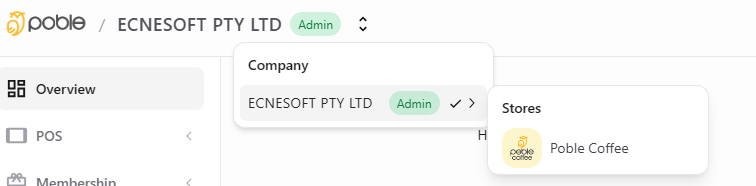
<Frame caption="POBLE 管理后台的公司与门店选择器">
  <img src="https://mintcdn.com/poble/oNVALq1MsOG10QBk/images/company-settings/overview.png?fit=max&auto=format&n=oNVALq1MsOG10QBk&q=85&s=212b276525b31c77d527eb91f74a24c9" alt="POBLE 管理后台的公司与门店选择器" width="756" height="186" data-path="images/company-settings/overview.png" />
</Frame>

<CardGroup cols={2}>
  <Card title="管理门店" href="/zh/poble-manual/company-settings/manage-stores">
    查看公司的门店并添加新门店。
  </Card>

  <Card title="管理管理员资料" href="/zh/poble-manual/company-settings/manage-admin-profiles">
    在 Profile 中查看和更新管理员信息。
  </Card>

  <Card title="修改管理员 PIN" href="/zh/poble-manual/company-settings/change-admin-pin-code">
    在个人资料中修改门店的 POS PIN。
  </Card>

  <Card title="添加管理员与管理员工" href="/zh/poble-manual/company-settings/add-admins-manage-employees">
    在 Employees 中添加管理员并查看员工。
  </Card>

  <Card title="管理访问权限" href="/zh/poble-manual/company-settings/manage-permissions">
    查看员工访问权限的 POS 角色预设。
  </Card>

  <Card title="设置角色权限" href="/zh/poble-manual/company-settings/set-role-permissions">
    配置各员工角色可执行的操作。
  </Card>

  <Card title="添加标志与横幅" href="/zh/poble-manual/company-settings/add-your-logo-banner">
    上传用于页眉和登录页面的公司品牌图片。
  </Card>

  <Card title="设置 Stripe 在线收款" href="/zh/poble-manual/company-settings/set-up-stripe-online-payments">
    开始设置用于在线收款的 Stripe 关联账户。
  </Card>

  <Card title="更新公司信息" href="/zh/poble-manual/company-settings/update-company-details">
    保持公司经营信息为最新状态。
  </Card>
</CardGroup>


This documentation is built and hosted on [Mintlify](https://mintlify.com), a developer documentation platform.