> ## Documentation Index
> Fetch the complete documentation index at: https://docs.poble.com.au/llms.txt
> Use this file to discover all available pages before exploring further.
# Add & Edit Store Menu Items
> Manage menu categories and items for an individual store.
Manage menu categories and items for an individual store.
**Where:** Backoffice → selected store → POS → Menu Settings
Open the selected store’s **Menu Settings** and choose the category you want to manage.
Select **Create Menu Item**. Enter the item name, price, category, and other details requested in the form, then complete the creation using its controls.
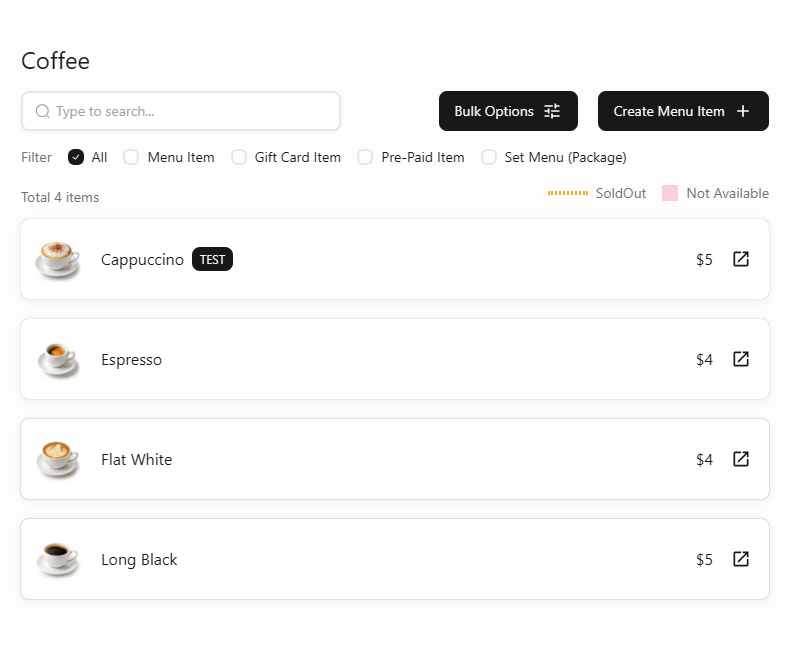 Open the item from the list and update its name, price, category, or other settings as needed. Review and apply the changes for the selected store.
To change the category itself, open the **…** menu beside its name and select **Edit Category**.
Open the item from the list and update its name, price, category, or other settings as needed. Review and apply the changes for the selected store.
To change the category itself, open the **…** menu beside its name and select **Edit Category**.
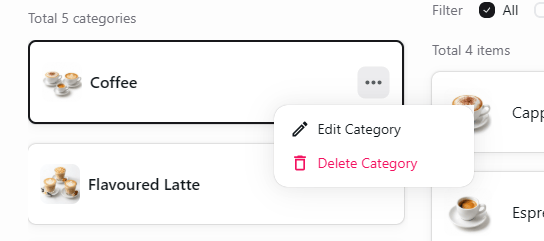 Use **Edit Category** to change a category and open the menu item to change its item details.
## Related guides
* [Create store categories](/poble-manual/menu-management/store/create-categories)
* [Create company menu items](/poble-manual/menu-management/company/manage-items)
This documentation is built and hosted on [Mintlify](https://mintlify.com), a developer documentation platform.
Use **Edit Category** to change a category and open the menu item to change its item details.
## Related guides
* [Create store categories](/poble-manual/menu-management/store/create-categories)
* [Create company menu items](/poble-manual/menu-management/company/manage-items)
This documentation is built and hosted on [Mintlify](https://mintlify.com), a developer documentation platform.