> ## Documentation Index
> Fetch the complete documentation index at: https://docs.poble.com.au/llms.txt
> Use this file to discover all available pages before exploring further.
# Company Settings
> Manage stores, people, access, company details, branding, and online payments.
Manage stores, people, access, company details, branding, and online payments.
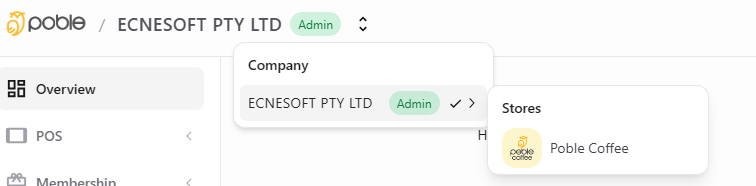
Use the selector at the top of the backoffice to choose your company. The company sidebar includes **Stores**, **Employees**, **Profile**, **Roles**, and **Company Settings**.
 View your company’s stores and add another location.
View and update administrator details in Profile.
Update the POS PIN for a store from your profile.
Add administrators and view staff from Employees.
Review POS role presets for staff access.
Configure the actions each staff role can perform.
Upload company branding for the header and sign-in page.
Start Stripe connected-account setup for online payments.
Keep company business information up to date.
This documentation is built and hosted on [Mintlify](https://mintlify.com), a developer documentation platform.
View your company’s stores and add another location.
View and update administrator details in Profile.
Update the POS PIN for a store from your profile.
Add administrators and view staff from Employees.
Review POS role presets for staff access.
Configure the actions each staff role can perform.
Upload company branding for the header and sign-in page.
Start Stripe connected-account setup for online payments.
Keep company business information up to date.
This documentation is built and hosted on [Mintlify](https://mintlify.com), a developer documentation platform.