> ## Documentation Index
> Fetch the complete documentation index at: https://docs.poble.com.au/llms.txt
> Use this file to discover all available pages before exploring further.
# 매장 비활성화
> Danger Zone에서 매장을 비활성화합니다.
Notion 가이드는 휴무 또는 더 이상 사용하지 않는 매장의 비활성화를 설명합니다. 진행 전에 화면의 경고를 주의 깊게 확인하세요.
## 매장 비활성화
비활성화할 매장을 선택하고 **Store Settings**를 여세요.
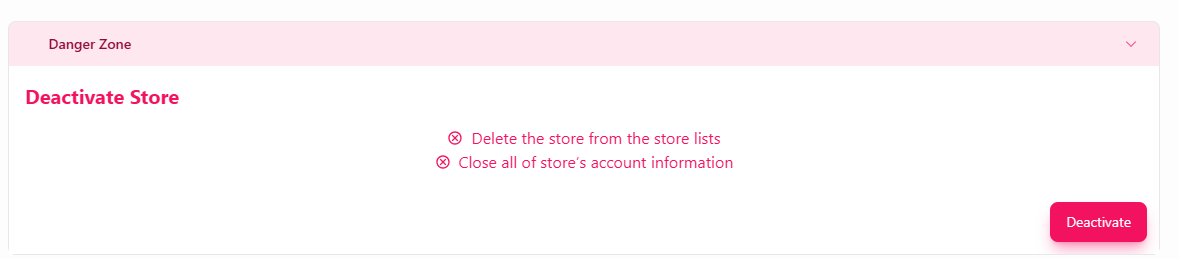
**Danger Zone**을 펼치고 **Deactivate Store**를 찾으세요.
원본 화면에는 **Delete the store from the store lists**와 **Close all of store’s account information**이 안내되어 있습니다. 매장 상황에 적합한 작업인지 확인하세요.
진행할 준비가 되었을 때만 **Deactivate**를 선택하세요. POBLE의 추가 안내가 표시되면 읽고 응답하세요.
 원본에는 데이터 보관, 청구 영향, 재활성화에 대한 설명이 없습니다. 임시 휴무에 비활성화를 사용하기 전에 POBLE 지원팀에 해당 내용을 확인하세요.
## 관련 가이드
* [영업시간 안내 메시지](/ko/poble-manual/store-settings/business-hours-message)
* [매장 관리](/ko/poble-manual/company-settings/manage-stores)
This documentation is built and hosted on [Mintlify](https://mintlify.com), a developer documentation platform.
원본에는 데이터 보관, 청구 영향, 재활성화에 대한 설명이 없습니다. 임시 휴무에 비활성화를 사용하기 전에 POBLE 지원팀에 해당 내용을 확인하세요.
## 관련 가이드
* [영업시간 안내 메시지](/ko/poble-manual/store-settings/business-hours-message)
* [매장 관리](/ko/poble-manual/company-settings/manage-stores)
This documentation is built and hosted on [Mintlify](https://mintlify.com), a developer documentation platform.