> ## Documentation Index
> Fetch the complete documentation index at: https://docs.poble.com.au/llms.txt
> Use this file to discover all available pages before exploring further.
# 결제 정보 입력 및 체험 시작
> 청구 설정을 완료하고 결제 화면에 표시된 체험을 시작합니다.
결제 화면을 완료해 계정 설정을 마치세요. Notion 매뉴얼은 **30일 무료 체험**을 안내하며, 시작 전 결제 화면의 혜택과 조건을 확인하세요.
## 결제 정보 입력 및 체험 시작
선택한 요금제와 추가 기능, **Total after trial**, **Total due today**를 확인하세요.
연락처와 카드 번호, 유효기간, CVC, 카드 명의자 이름을 입력하세요.
결제 양식에서 요청하는 청구지 주소와 사업자 또는 ABN 정보를 입력하세요.
입력 정보와 표시된 요금을 확인하고 **Start trial**을 선택하세요.
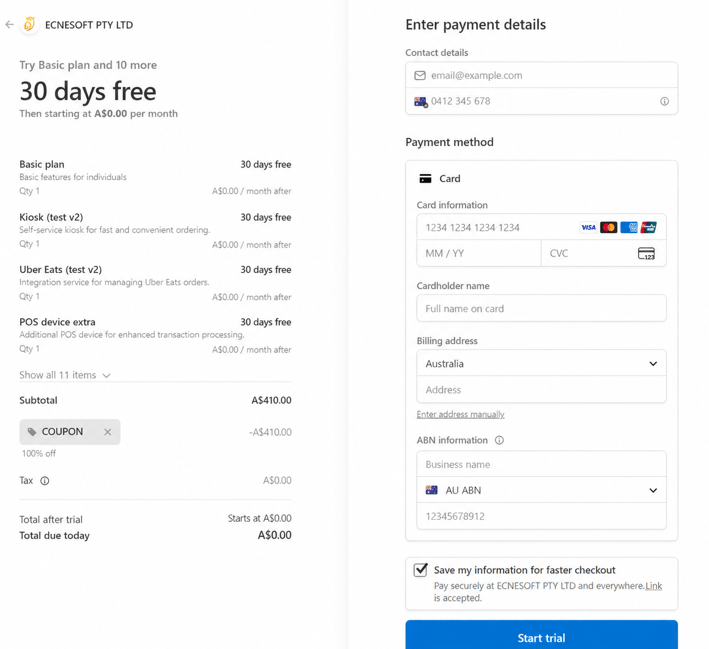 가입 시에는 결제 화면에 표시되는 체험 기간과 요금이 적용됩니다. 예시와 다르더라도 실제 화면의 내용을 확인하세요.
## 관련 가이드
* [회사 설정](/ko/poble-manual/company-settings/overview)
This documentation is built and hosted on [Mintlify](https://mintlify.com), a developer documentation platform.
가입 시에는 결제 화면에 표시되는 체험 기간과 요금이 적용됩니다. 예시와 다르더라도 실제 화면의 내용을 확인하세요.
## 관련 가이드
* [회사 설정](/ko/poble-manual/company-settings/overview)
This documentation is built and hosted on [Mintlify](https://mintlify.com), a developer documentation platform.