> ## Documentation Index
> Fetch the complete documentation index at: https://docs.poble.com.au/llms.txt
> Use this file to discover all available pages before exploring further.
# 구독 요금제 선택
> 비즈니스에 맞는 구독 요금제를 선택합니다.
**Choose Your Subscription Plan**에서 제공되는 요금제를 확인하고 비즈니스에 맞는 항목을 선택하세요.
## 구독 요금제 선택
각 요금제의 기능과 표시된 월 요금을 확인하세요. 예시의 **Basic plan**에는 듀얼 화면, 포장 주문, 메뉴 관리, 주문 관리, 기본 보고서가 포함됩니다.
사용할 요금제를 선택하세요. 선택한 요금제에는 **Selected**가 표시됩니다.
**Customise with Add-ons**로 이동해 필요한 추가 기능을 선택하세요.
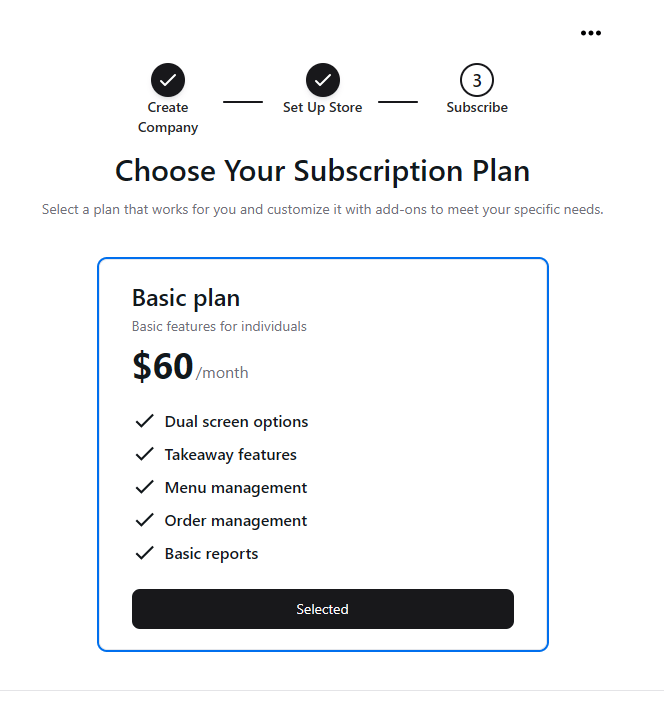 현재 설정 화면에 표시되는 가격과 기능을 기준으로 선택하세요. 스크린샷은 원본 인터페이스의 예시입니다.
## 관련 가이드
* [추가 기능 선택](/ko/poble-manual/getting-started/customise-with-add-ons)
This documentation is built and hosted on [Mintlify](https://mintlify.com), a developer documentation platform.
현재 설정 화면에 표시되는 가격과 기능을 기준으로 선택하세요. 스크린샷은 원본 인터페이스의 예시입니다.
## 관련 가이드
* [추가 기능 선택](/ko/poble-manual/getting-started/customise-with-add-ons)
This documentation is built and hosted on [Mintlify](https://mintlify.com), a developer documentation platform.